
EverythingWeather
corymotticeWeather
4.4145.00 Reviews
- Version
- 1.6.0
- Installs
- 10.00K
- Age Rating
- Everyone
Screenshots
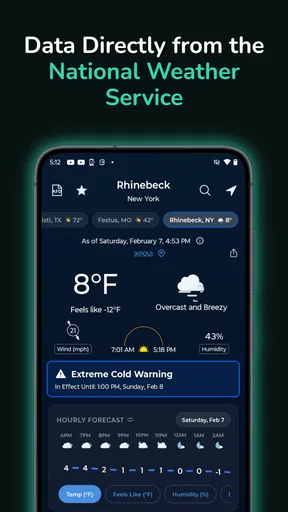
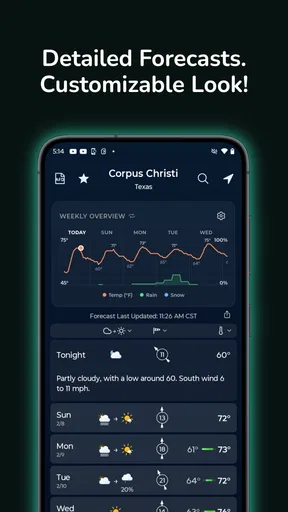
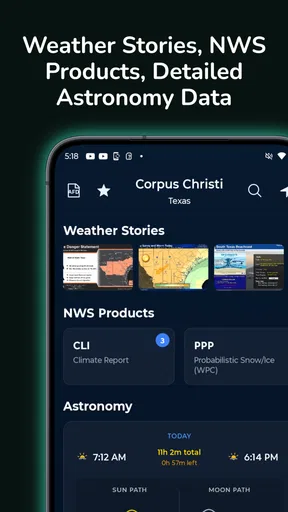
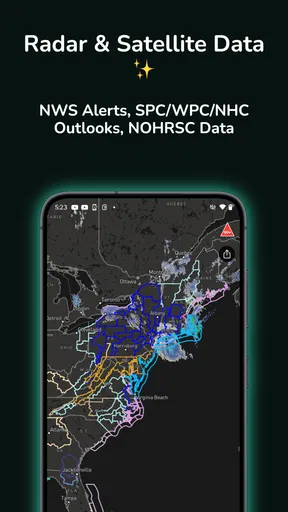
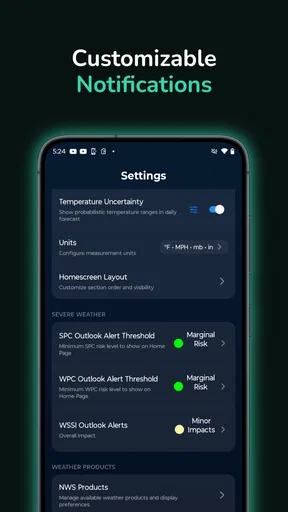
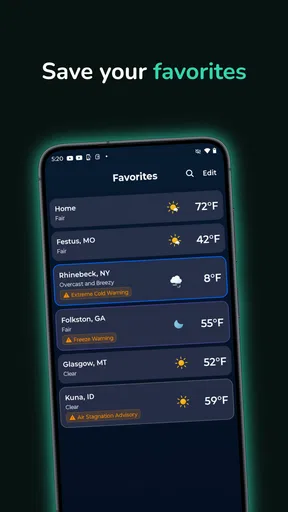
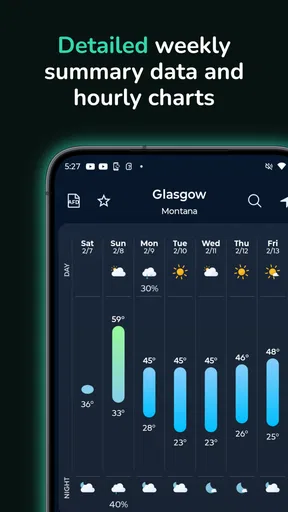
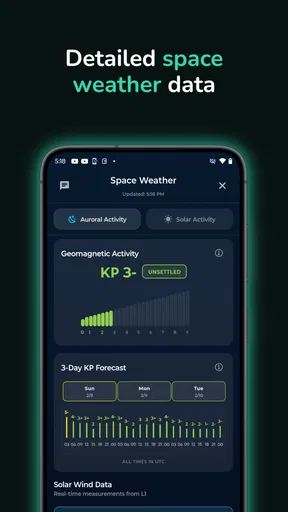
Our Review of EverythingWeather
 Analysis by Appyee
I usually know within a week whether a weather app is going to become part of my routine or quietly disappear from my home screen. EverythingWeather made a good first impression because it takes a straightforward approach: it is a free weather app built around information from NOAA’s National Weather Service, rather than trying to turn a simple forecast into a noisy entertainment feed. That focus gives it a practical feel from the start.
After spending time with it, I see the appeal clearly. This is aimed at people who want weather information they can check before leaving home, planning a walk, deciding whether to carry an umbrella, or judging if outdoor work is sensible. It is not the sort of app I would choose for animated radar visuals, lifestyle content, or a heavily personalized dashboard. Its value depends more on dependable daily access to official weather information than on visual novelty.
That distinction matters because weather apps are easy to install and just as easy to abandon. The first few checks can feel useful, but lasting value comes from whether the app remains quick, understandable, and relevant when the forecast becomes part of a repeated habit. My experience with EverythingWeather is that it has a solid chance of earning that place, although its appeal is strongest for users who prefer a focused source over a feature-packed weather suite.
From a promising first week to a useful routine
I judge a weather app by whether it helps me make a small decision without turning a quick check into a long session. In this section, I look at how EverythingWeather’s focused NOAA-based approach can fit into a first-week routine, and where I’d still want to use judgment when the day’s plans matter. A simple habit—checking before choosing when to leave—can reveal more than browsing every screen at once.
Why the initial experience feels practical
The first-week appeal comes from the app’s clear identity. EverythingWeather is not trying to be a general news service or a social platform with weather attached. The developer, corymottice, has positioned it as a dedicated weather tool, and that narrow purpose makes the app easier to understand. I can open it with one question in mind: what should I expect from the weather where I am?
Using NOAA’s National Weather Service as the data source is also a meaningful choice. Many people do not think about where a forecast originates, but source selection affects how much confidence I place in the information. I still treat every forecast as a forecast rather than a promise, particularly when conditions are changing quickly, yet an official national weather service is a reassuring foundation for everyday planning.
The app’s current version is 1.6.0, and it runs on Android starting with version 7.0. That makes it accessible to people using older phones who may not want to replace a device just to install a modern weather utility. For someone with a basic handset, a family member’s older phone, or a spare device used for outdoor activities, that compatibility can matter more than decorative interface effects.
During the first week, I would use it at predictable moments: before commuting, before choosing clothes, and before deciding whether a walk or errand can wait. Those checks are not exciting, but that is exactly the point. A weather app earns trust by reducing small decisions, not by demanding attention. If EverythingWeather gives me the information I need without making me browse through unrelated material, it fits naturally into those moments.
A realistic morning use case
Imagine a weekday morning when I need to walk to a bus stop, spend part of the day outside, and return home in the evening. I am not looking for a colorful weather story. I need to know whether light clothing is sensible, whether rain could complicate the walk, and whether the later conditions are different enough to change my plans.
That is where a focused app can be more useful than a crowded alternative. I can make the check part of getting ready instead of opening a broader portal full of headlines, videos, alerts, and promotional panels. The practical habit is to look at the forecast once in the morning, then check again before leaving work if the day appears unsettled. This approach keeps the app useful without turning weather into something I monitor constantly.
For outdoor workers, dog owners, cyclists, parents, and anyone who plans around changing conditions, that repeated glance has genuine value. It is especially helpful when the decision is not dramatic but still important: whether to bring a second layer, move a chore earlier, or take a different route. EverythingWeather makes the most sense when weather information is a small input into a larger daily plan.
What the early appeal does not cover
The app’s focused nature also sets expectations. If I want rich map interaction, detailed storm tracking, extensive historical charts, or a large collection of widgets and customization controls, I would look at a more specialized alternative. EverythingWeather’s strength is not that it replaces every weather tool. Its strength is that it can serve as a simple, official-source-centered option for ordinary forecast checks.
That trade-off is easy to miss during installation. A compact weather app may feel refreshing at first, but some users will soon ask for more layers of information. If your weather decisions depend on highly detailed visual analysis, you may enjoy the first few days and then return to a radar-focused app. I would not consider that a failure; it simply means the app is best judged by the job it is trying to do.
Who is likely to settle into it
I think EverythingWeather suits people who value clarity over spectacle, want a free starting point, and prefer information tied to NOAA’s National Weather Service. It is also a sensible candidate for users who need an app compatible with an older Android device. The Everyone content rating makes it suitable for a broad household audience, including people who want to keep the weather check simple for children or older relatives.
On the other hand, I would skip it if my main reason for installing a weather app were visual radar exploration, deep customization, or a broad collection of location-management tools. I would also hesitate if I only trust an app that combines several independent forecast sources in one place. EverythingWeather’s identity is built around a particular official source, so that focus will feel like a benefit to some users and a limitation to others.
What remains useful after the novelty fades
The longer-term question is whether a straightforward forecast remains useful when there is nothing new to explore. I consider how I’d keep the app in my routine without checking compulsively, and how to recognize when my needs have outgrown a focused weather tool. That distinction helps me decide whether EverythingWeather is a lasting everyday companion or whether a more specialized option would serve me better.
The month-to-month test
The real question is not whether EverythingWeather is pleasant during the first week. Almost any weather app can be interesting while I am exploring it. The stronger test is whether I still open it several weeks later without feeling that it has become another piece of digital clutter.
For me, recurring value comes from repetition. I do not need to discover a new feature every month. I need the app to remain a dependable checkpoint before plans that depend on the outdoors. A weather app can be successful even when it feels uneventful, because its job is to provide a small amount of useful information at the right time.
That makes the NOAA connection more important over time than it might seem at installation. A source associated with the National Weather Service gives the app a clear reason to remain in my routine. Instead of opening it because of novelty, I open it because I know what kind of information it is intended to provide. This is a healthier long-term relationship with a utility app than constantly chasing new visual features.
The app has an average rating of 4.4 from roughly 337 ratings, with about 145 written reviews. Those figures suggest that existing users generally respond well to the experience, while the written feedback gives potential users a useful reminder to look for comments that match their own needs. A rating can indicate broad satisfaction, but it cannot tell me whether the app is ideal for radar fans, commuters, gardeners, or people with older devices.
Building a low-effort weather habit
The best way to keep the app useful is to attach it to an existing routine rather than checking it randomly. I would place it near the apps I already use before leaving home, then make a quick morning check part of getting dressed. For outdoor plans, I would check again shortly before departure instead of repeatedly refreshing throughout the day.
There is a useful trade-off here. Checking too rarely can leave me unprepared for a change, while checking too often can create anxiety without improving a decision. EverythingWeather works best when I use it to answer a specific question: can I do this outside, and what should I bring? That framing prevents a simple forecast app from becoming a source of unnecessary distraction.
Another practical habit is to compare the forecast with what I actually experience, especially during the first few weeks. I can notice whether the information is useful for my neighborhood and the kinds of plans I make. That does not mean treating personal observation as a scientific replacement for a forecast. It simply helps me learn when the app is most helpful and when changing local conditions deserve extra caution.
When another app is the better monthly companion
Month-to-month value depends on what I need from weather information. A person who plans hikes may want detailed terrain-aware information, visual precipitation movement, or specialized outdoor data. A commuter may prioritize quick notifications and glanceable information. Someone responsible for severe-weather preparation may need a dedicated alert and radar workflow.
In those cases, a more comprehensive weather service could be a better primary tool. EverythingWeather can still be useful as a straightforward reference, but I would not force it into a role it was not designed to fill. The right comparison is not “which app has more features?” but “which app helps me make my usual weather decisions with the least friction?” For simple daily checks, a focused app can beat a larger one. For complex planning, the opposite may be true.
Free access and the question of lasting cost
EverythingWeather is free to install, which lowers the barrier to trying it. That matters for a utility people often test briefly before deciding whether it deserves a permanent place on the phone. The app also includes optional in-app purchases ranging from $1.99 to $39.99 per item, so I would pay attention to what is available before treating the free entry point as the complete long-term experience.
My advice is simple: start with the free experience and decide whether the core weather workflow is already useful. Do not pay merely because the app becomes part of your routine. A purchase makes sense only if an optional addition solves a specific problem you actually have. For a basic morning forecast, the free starting point may be enough; for users who want more from the app, the value depends on whether those extras fit their habits rather than on the existence of the purchase option itself.
Maintenance without turning weather into a chore
Weather apps usually need little active maintenance, but I still think about a few practical responsibilities. I would keep the app updated when a new version is offered, especially because the current release is 1.6.0 and later changes may affect reliability or usability. I would also review its place on my phone after a month: am I opening it for real decisions, or only keeping it because I once liked the idea?
That small audit is useful for any utility, but it is particularly relevant here because weather information is repetitive by nature. The app should not require constant setup to justify itself. If I need to spend more time organizing it than using it, the maintenance burden has become too high for its role.
I would also avoid treating a single forecast as certainty during fast-changing conditions. The app can support a decision, but it cannot remove the need for judgment. For important outdoor work or hazardous weather, I would check current official guidance and local alerts as appropriate rather than relying on one casual glance. That is not a criticism of EverythingWeather; it is a sensible boundary for any everyday forecast app.
Where fatigue can appear
The main source of fatigue is repetition without enough personal payoff. If my days rarely depend on outdoor conditions, I may stop opening the app regardless of how cleanly it works. A weather utility cannot manufacture a need for itself. Its lasting value comes from matching the user’s life.
Another possible frustration is the gap between a focused design and a user’s growing expectations. At first, simplicity feels efficient. Later, I may want more ways to compare locations, inspect developing conditions, or tailor the information to specialized plans. If those needs become central, I would probably move to a broader weather product rather than expecting EverythingWeather to become something else.
The source focus can also shape how I interpret disagreements with other apps. If another service shows a different forecast, I should not automatically assume EverythingWeather is wrong or that the other app is right. Forecasts can differ because services process information differently or emphasize different presentation choices. The sensible response is to identify which source I trust for the decision at hand and to use additional official guidance when conditions matter.
My long-term verdict
After the first-week curiosity has passed, EverythingWeather still makes sense as a compact, source-focused weather companion. I like that its purpose is easy to explain, its entry cost is low, and its Android compatibility reaches older devices. The connection to NOAA’s National Weather Service gives it a clear foundation, while the Everyone rating keeps it approachable for a wide range of users.
I would recommend it to a friend who wants a calm, practical weather check rather than a full weather command center. It is particularly suitable for morning routines, everyday errands, school runs, dog walks, and ordinary outdoor planning. The strongest reason to keep it installed is not a flashy feature but the possibility of forming a reliable habit around a focused source.
I would not recommend making it the only weather tool for highly specialized outdoor planning, detailed storm analysis, or anyone who expects extensive customization. Those users may be happier with a richer alternative. I would also tell anyone considering an in-app purchase to use the free version first and judge the optional cost against a real recurring need.
My final view is that EverythingWeather earns lasting space when I treat it as a quiet utility, not an all-purpose weather universe. It is free to try, grounded in NOAA’s National Weather Service, and simple enough to become part of a daily routine. Its success depends on whether that focused approach matches your decisions. If it does, the app can remain useful long after the novelty fades; if it does not, a more specialized alternative will be the better long-term choice.
Verdict
Strengths of EverythingWeather
- Clean interface makes forecasts easy to scan quickly.
- Provides useful weather details beyond just the current temperature.
- Convenient for checking conditions before travel or outdoor plans.
- Forecast information is presented in a straightforward, readable format.
- Can help users monitor changing weather throughout the day.
Limitations of EverythingWeather
- Forecast accuracy may vary depending on location and data coverage.
- Some advanced features may require an internet connection.
- Frequent weather updates can use additional mobile data and battery.
- The amount of information may feel overwhelming for casual users.
- Notifications may become distracting if too many alerts are enabled.
Similar Picks in This Category
View All
Weather - By Xiaomi
Xiaomi Inc.4.1

Weather & Radar Forecast
WetterOnline4.8

Weather
OneLouder Apps4.6

AccuWeather: Weather Radar
AccuWeather3.6

The Weather Channel - Radar
The Weather Channel4.6

1Weather Forecasts & Radar
OneLouder Apps4.3
Frequently Asked Questions
What is EverythingWeather, and what information does it provide?
EverythingWeather is a weather application designed to give you quick access to current conditions, forecasts, and other useful atmospheric information. After exploring the app, its main purpose is to help users check temperatures, precipitation chances, wind, humidity, and general weather trends in one place. The exact features and forecast coverage may depend on your location, device, and the data sources available in your region.
Does EverythingWeather provide accurate and reliable forecasts?
EverythingWeather can be useful for everyday planning, but no weather application can guarantee perfect forecasts. Weather predictions are based on meteorological data and may change as conditions develop, especially during severe or rapidly changing weather. In my experience reviewing weather apps, short-term forecasts are usually more dependable than long-range predictions. Users should still follow official local alerts during storms, floods, extreme temperatures, or other dangerous conditions.
Does EverythingWeather require location access to work?
EverythingWeather may request location permission so it can automatically display weather conditions and forecasts for your current area. You can usually choose whether to allow precise or approximate location access, depending on your device and operating system. If you prefer not to share your location, the app may still work when you manually enter a city or region, although automatic updates and location-based notifications could be limited.
Is EverythingWeather free to download and use?
The availability of free features, advertising, subscriptions, or in-app purchases can vary according to the version of EverythingWeather and the platform where you download it. Before installing, check the official Google Play Store or Apple App Store listing for current pricing details. It is also worth reviewing the subscription terms carefully, particularly if premium forecasts, widgets, alerts, or additional weather tools are offered.
Can EverythingWeather send severe weather alerts and notifications?
EverythingWeather may support notifications for forecast changes, rain, temperature changes, or severe weather, depending on the features enabled in your version and the data available in your location. You will need to grant notification permission and configure the alert settings to receive them. Because mobile notifications can be delayed or affected by battery-saving restrictions, do not rely on the app alone for emergency warnings; consult official local authorities when conditions become dangerous.
